
Self-Storage Kiosk vs. AI: Do You Still Need Kiosk Hardware?
Compare self-storage kiosks with AI automation. Learn about kiosk costs, self-service storage, software alternatives, and when each option makes sense.

Self-Storage Kiosk vs. AI: Do You Still Need Kiosk Hardware?
For years, offering self-service storage usually meant installing a self-storage kiosk at the facility.
Put a machine near the office, connect it to your storage management software, and give customers another way to rent units or manage their accounts when an employee isn't available.
That model made sense.
But the customer journey has changed.
Today, someone looking for storage is far more likely to start on their phone than walk up to a machine at your property.
They search Google.
Visit your website.
Call the facility.
Ask about pricing.
Compare unit sizes.
And increasingly, they expect to complete the entire process without waiting for office hours.
That raises an important question for operators:
Do you still need physical kiosk hardware to provide self-service—or can software now do the job?
The answer depends on what you're actually trying to accomplish.
What Is a Self-Storage Kiosk System?
A self-storage kiosk system is a physical self-service terminal and supporting software that allows customers to complete routine storage transactions without direct assistance from an employee.
Depending on the storage unit kiosk and its integration with your facility management software, customers may be able to:
View available units
Select a unit size
Complete a storage rental
Make payments
Purchase insurance or tenant protection
Sign agreements
Receive move-in instructions
For operators looking to extend service beyond office hours, an automated self-storage kiosk can provide a useful alternative to keeping someone behind the desk.
But there's an important limitation built into the model:
The customer has to reach the kiosk first.
And today, much of the rental decision happens before a prospect ever arrives at the facility.
The Self-Service Storage Experience Has Moved Online
Think about how someone rents storage today.
They might search "storage near me" from their couch at 9:30 PM.
They visit three websites.
Then they call two facilities.
One doesn't answer.
The other immediately explains which units are available, answers a question about climate control, and helps them move toward a reservation.
That rental may be decided before the customer ever sees either property.
This is why the meaning of self-service storage is changing.
Self-service no longer has to mean:
Customer → Physical Kiosk → Rental
It can also mean:
Customer → Phone or Website → Conversation → Rental
The objective hasn't changed.
The interface has.
What Does a Self-Storage Kiosk Cost?
Cost is one of the first questions operators should consider when comparing physical kiosks with software-based alternatives.
A storage kiosk isn't simply software. Depending on the solution, the total self-storage kiosk cost can include:
Hardware
Installation
Connectivity
Maintenance
Repairs
Software subscriptions
Payment processing
Support
Future hardware replacement
Pricing varies substantially by vendor, configuration, integrations, and whether the unit is designed for indoor or outdoor use.
That makes total cost of ownership more useful than looking at the initial hardware price alone.
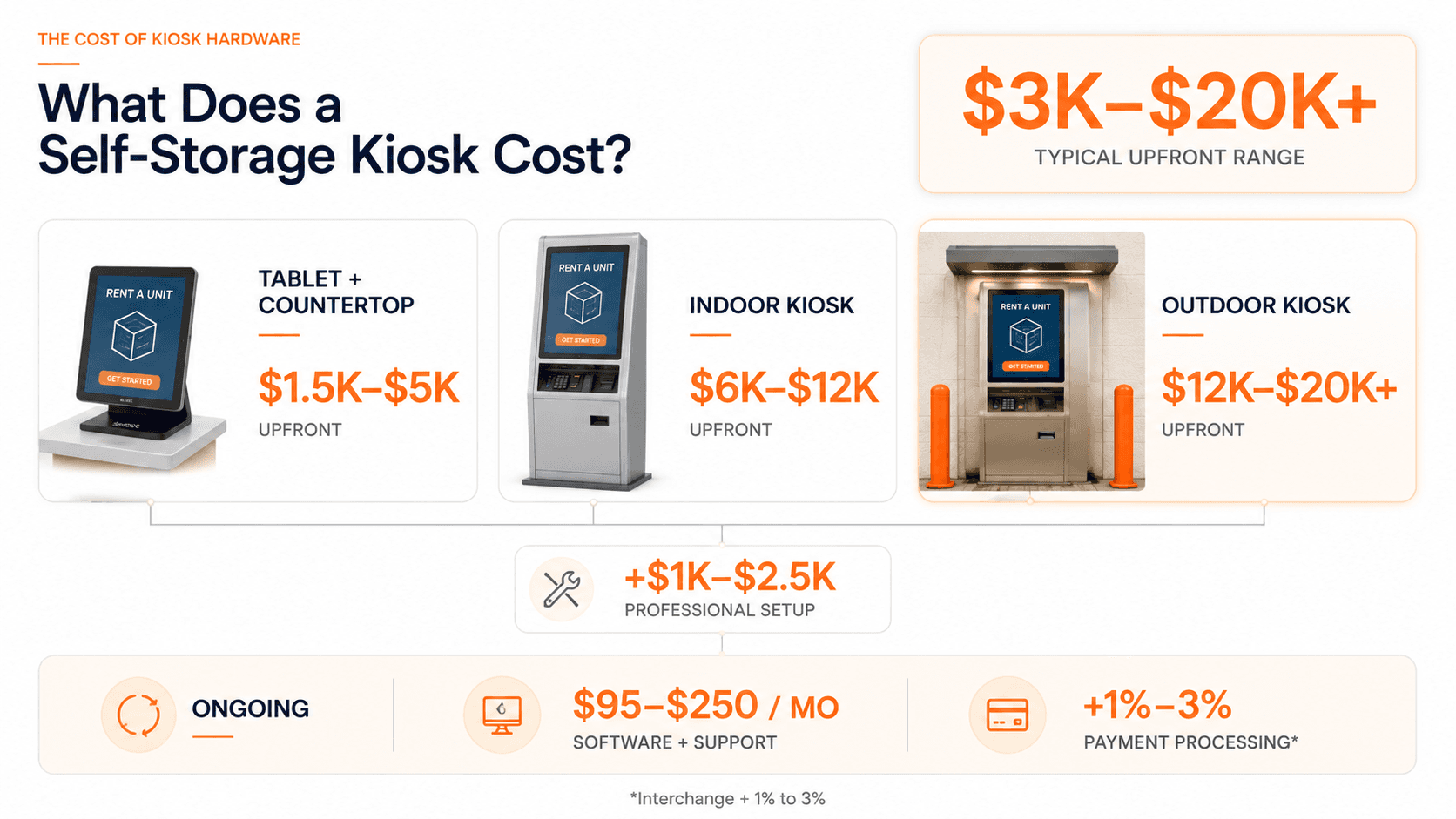
The total cost to set up a self-storage kiosk typically ranges from $3,000 to $20,000+ upfront, depending on whether it is an indoor or outdoor model, followed by $95 to $250 per month in ongoing software and support fees.
But there's an even more important question:
Where are your customers actually trying to reach you?
If most inquiries begin through your website or phone, investing exclusively in an on-property interface may not address the largest source of customer friction.
What Are the Alternatives to a Self-Storage Kiosk?
A physical kiosk is no longer the only way to offer 24/7 self-service.
Depending on the facility, self-storage kiosk alternatives can include:
Online rentals
AI phone answering
Website AI assistants
Remote customer support
Digital payments
Automated follow-ups
Remote management
Automated workflows connected to existing storage management software
The right alternative depends on where customers need help.
If the problem is on-site payment or walk-in service, kiosk hardware may still be useful.
If the problem is missed calls, after-hours inquiries, repetitive questions, or abandoned online rentals, a software-first approach can address the problem earlier in the customer journey.
That's an important distinction.
A storage rental kiosk helps a customer who reaches your property.
Phone and website automation can help the customer before they ever get there.
Can AI Replace a Storage Rental Kiosk?
For some workflows, yes.
For others, no.
Modern AI agents can interact with customers through channels they're already using—particularly phone and web.
An AI agent configured for a self-storage facility can help customers:
Check unit availability
Understand unit sizes
Ask about pricing
Learn facility policies
Explain their storage needs
Complete or initiate a reservation
Get move-in information
Ask routine account questions
Receive assistance after office hours
That creates a different form of self-storage automation.
Instead of asking customers to interact with a machine at the facility, the self-service layer becomes available wherever the customer already is.
And because the interface is conversational, customers don't necessarily need to navigate menus or know exactly what they're looking for before asking for help.
Self-Storage Kiosk vs. AI: What's the Difference?
The better question isn't whether AI is "better" than a kiosk.
It's what job you need the technology to perform.
Capability | Physical Self-Storage Kiosk | AI Agent |
|---|---|---|
On-property self-service | Strong | Depends on deployment |
Phone conversations | No | Yes |
Website conversations | Limited | Yes |
After-hours assistance | Yes | Yes |
Unit recommendations | Interface-driven | Conversational |
Remote customer support | Limited | Yes |
Physical payment terminal | Yes | No |
Dedicated kiosk hardware | Required | Not required |
Human escalation | Limited | Can be configured |
Works before customer arrives | Limited | Yes |
For some facilities, these technologies can complement each other.
An operator doesn't necessarily have to choose between a kiosk and AI.
The mistake is assuming every self-service strategy requires the same interface.
When a Self-Storage Kiosk Still Makes Sense
There are situations where physical kiosk hardware remains useful.
A facility may receive significant walk-in traffic.
Customers may need an on-site payment interface.
An operator may intentionally design an unattended property around physical self-service infrastructure.
Or an existing kiosk may already work extremely well.
In those situations, replacing functional technology simply because AI is newer doesn't make much sense.
Technology should solve an operational problem.
Not create a new one.
When Software-First Self-Service Makes More Sense
AI becomes particularly interesting when the challenge occurs before customers reach the property.
For example:
Your office receives calls after hours.
Managers regularly miss calls while walking the property.
Prospective tenants have questions before completing an online rental.
Your team repeatedly explains unit sizes, pricing, access hours, or move-in requirements.
You operate several facilities and want to centralize routine customer support.
Those aren't necessarily kiosk problems.
They're communication problems.
And communication increasingly happens through phones, websites, and messaging rather than a physical terminal.
For operators facing those challenges, storage automation can extend self-service beyond the property itself.
From Self-Service to Automated Storage Rentals
This is where the definition of self-storage self-service is becoming broader.
Traditionally, self-service meant giving the customer a machine or website where they could complete a transaction themselves.
AI introduces another possibility: customers can simply explain what they need.
Someone might say:
"I'm moving out of a two-bedroom apartment. What size unit should I get?"
Or:
"Can I rent a climate-controlled unit and move in tomorrow morning?"
The system can understand the request, provide relevant information, and help move the customer toward the next step.
That means automated storage rentals don't necessarily need to feel like automation.
The experience can still feel conversational.
The Better Question: Where Does the Customer Get Stuck?
Operators evaluating storage kiosk software, storage automation, AI agents, call centers, or other self-service tools often begin by comparing features.
Start somewhere else.
Map the rental journey.
Ask:
Where does the customer wait?
Where do prospects abandon the process?
What requires an employee today?
Which questions are repeated every day?
Which interactions happen after hours?
Which interactions require physical hardware?
Which interactions could happen remotely?
Once you understand those points of friction, the technology decision becomes much easier.
If customers regularly arrive at your property and need a physical self-service interface, a kiosk may make perfect sense.
If customers are disappearing before they ever reach the property, the answer may be somewhere else entirely.
Self-Service Doesn't Have to Mean a Kiosk
The self-storage kiosk solved an important problem:
How do we let customers do more without requiring an employee to be standing behind the counter?
That problem still exists.
But operators now have more ways to solve it.
Voice AI.
Website AI.
Online rentals.
Automated workflows.
Remote management.
Physical kiosks.
The strongest self-service strategy may ultimately combine several of them.
Because customers don't care whether you call the technology a kiosk, an AI agent, or an automation platform.
They care about one thing:
Can I get what I need right now?
And increasingly, the best self-storage technology is the technology that lets them say yes.
Frequently Asked Questions About Self-Storage Kiosks
What is a self-storage kiosk?
A self-storage kiosk is a physical self-service terminal that allows customers to complete routine transactions such as selecting units, beginning or completing rentals, and making payments without direct assistance from an employee.
How much does a self-storage kiosk cost?
Self-storage kiosk costs vary based on hardware, indoor or outdoor configuration, installation, software, payment processing, integrations, maintenance, and support. Operators should compare total cost of ownership rather than hardware price alone.
What are the alternatives to a self-storage kiosk?
Common self-storage kiosk alternatives include online rentals, AI phone answering, website assistants, digital payments, remote customer support, and automated workflows. The right approach depends on whether customers need assistance at the property or earlier in the rental journey.
Can customers rent storage units without a kiosk?
Yes. Online rental systems and conversational AI can allow customers to get information and begin or complete rental workflows through websites and phones without using a physical storage rental kiosk.
Can AI replace a self-storage kiosk?
AI can replace or complement some kiosk functions, particularly customer questions, unit recommendations, reservation assistance, and remote support. A physical kiosk may still make sense when customers require an on-property terminal or other hardware-specific functionality.
What is self-storage automation?
Self-storage automation uses technology to handle repetitive customer or operational tasks such as answering inquiries, supporting rentals, sending follow-ups, updating systems, providing after-hours assistance, and routing exceptions to staff.
Do unmanned self-storage facilities need kiosks?
Not necessarily. An unmanned facility can combine online rentals, access-control technology, remote management, AI customer support, digital payments, and physical kiosks depending on how the property operates.