Self-Storage Software Integrations: PMS, APIs & AI | EasyBee AI
Learn how AI works with self-storage software, PMS platforms and APIs, including Sitelink, Storable Edge and Yardi—and what integration really means.

Self-Storage Software Integrations: Adding AI Without Replacing Your PMS
Most self-storage operators exploring AI aren’t starting with an empty technology stack.
They already have a property management system.
Online rentals.
Payments.
Gate access.
A website.
Reporting tools.
Maybe a CRM, call center, or other systems layered around them.
So one of the first questions operators ask when evaluating AI is:
Will it work with the self-storage software we already use?
It’s an important question. But there’s a better version of it:
What does the AI need to know or do inside our existing software?
That’s because self-storage software integration isn’t a simple yes-or-no capability.
One integration might allow a system to retrieve unit availability. Another might support updating records or initiating specific workflows. Some software providers make APIs available to approved third parties or customers, while other AI use cases may work alongside the PMS without requiring a direct connection at all.
For operators using systems such as Sitelink by Storable, Storable Edge (formerly storEDGE), Yardi Breeze Premier, Yardi Storage Manager, or other self-storage platforms, the goal shouldn’t automatically be replacing the PMS.
The better approach is understanding where AI fits around the systems already running the facility.
What Is a Self-Storage PMS?
A property management system, or PMS, is the operational software at the center of many self-storage businesses.
Depending on the platform, it may manage functions such as:
Unit inventory and availability
Tenant records
Leasing
Billing and payments
Move-ins and move-outs
Pricing
Delinquency
Reporting
Communications
Access-control connections
Accounting
The exact capabilities vary by platform.
That’s important when discussing AI.
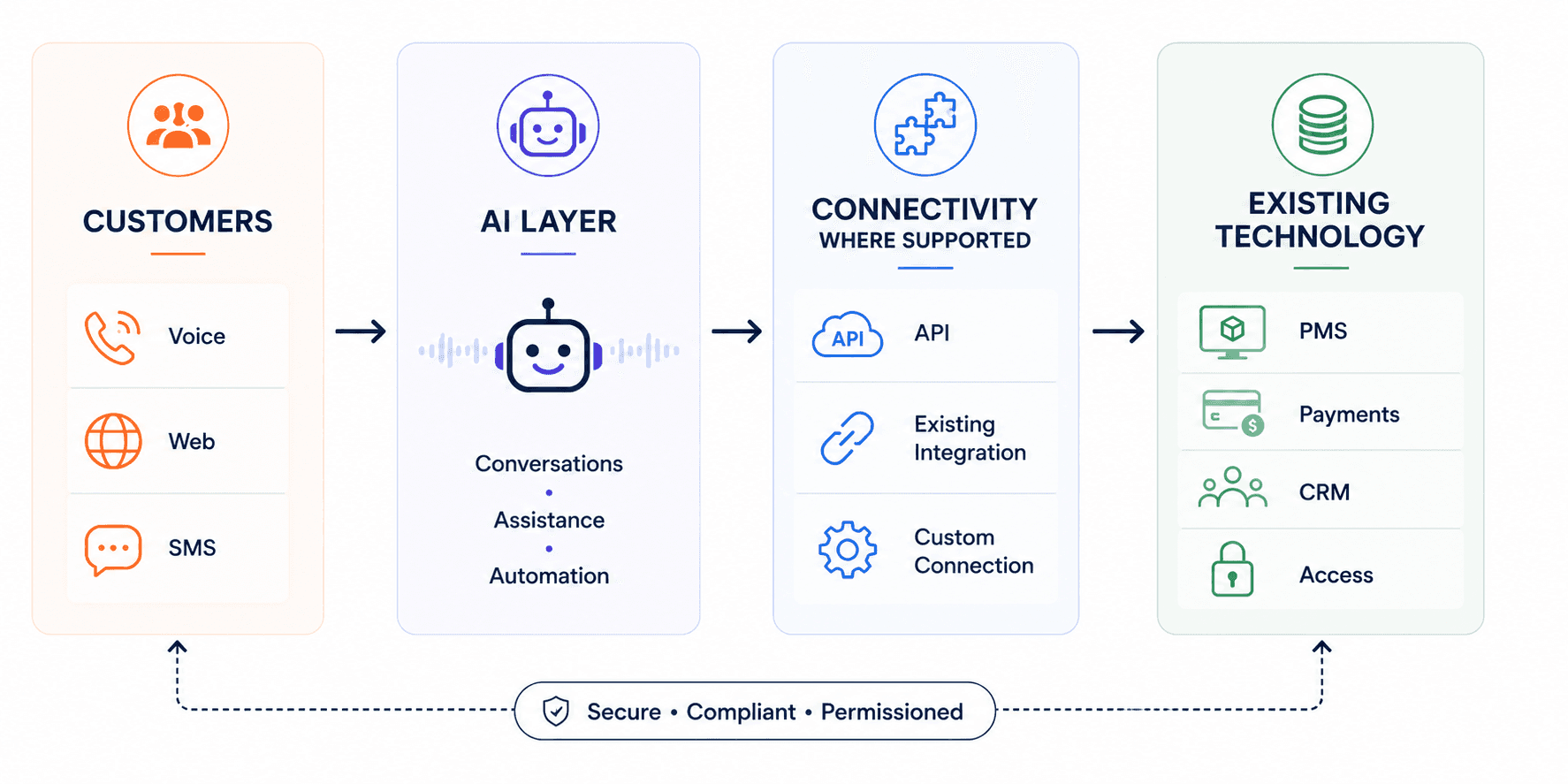
AI may become the conversational layer a customer interacts with, while the PMS remains the system of record containing the operational information behind that conversation.
If someone asks:
“Do you have a 10×10 available?”
the AI needs a reliable source for current availability if it is going to answer that question in real time.
If the customer wants to rent it, another system may need to execute or record that transaction.
If an existing tenant asks an account-specific question, the AI may require authorized access to customer information.
That’s where self-storage PMS integration becomes important.
Understanding the Self-Storage Software Landscape
Before discussing AI integrations, it helps to understand that the major self-storage platforms aren’t identical.
Different platforms have different product philosophies, ecosystems and approaches to third-party connectivity.
Here’s a simplified view:
Platform | Provider | General Positioning | Integration Consideration |
|---|---|---|---|
Sitelink | Storable | Highly configurable self-storage management platform | Strong emphasis on third-party integrations; determine exactly what API/workflow access is available |
Storable Edge | Storable | Integrated platform emphasizing streamlined daily operations | Determine what needs to connect outside the broader Storable ecosystem |
Yardi Breeze Premier | Yardi | Self-storage management for smaller and midsized businesses | Contact Yardi regarding available interfaces and integrations for the required workflow |
Yardi Storage Manager | Yardi | Enterprise-oriented self-storage platform | Larger portfolios may require broader integration and data architecture considerations |
The point isn’t that one platform is inherently better for AI.
It’s that storage management software integration needs can look different depending on the technology stack already in place.
Sitelink Integration: What Should Operators Know?
Sitelink by Storable is an established self-storage management platform now operating within the Storable ecosystem.
Storable positions Sitelink as a highly configurable platform, with customizable workflows, reporting and a substantial third-party integration ecosystem.
That makes Sitelink integration particularly relevant when operators evaluate AI, automation, communications, access control, analytics or other technology around their PMS.
But “integrates with Sitelink” still doesn’t tell you enough.
Suppose you want an AI system to handle rental inquiries.
You need to determine what the AI actually needs from Sitelink.
Does it need to:
Read unit availability?
Retrieve current pricing?
Access facility-specific information?
Create or update information?
Support a reservation or rental workflow?
Those are different technical requirements.
A connection that can retrieve information is not necessarily a connection that can modify records or initiate transactions.
So when evaluating a Sitelink integration, don’t stop at whether a connection exists.
Ask exactly what the connection allows the other system to read, write and do.
storEDGE Integration: What Changed With Storable Edge?
Operators searching for a storEDGE integration should know about an important naming change:
storEDGE is now Storable Edge.
Storable announced the Edge branding as part of the evolution of its software portfolio, so operators may encounter both `storEDGE` and `Storable Edge` when researching software and integrations.
Storable positions Edge somewhat differently from Sitelink.
While Sitelink emphasizes configurability and complex workflows, Storable describes Edge as an intuitive, all-in-one facility-management platform designed around streamlined operations and built-in automation.
For operators considering an AI integration with Storable Edge, the first question should therefore be:
What information or workflow actually needs to move outside the existing platform?
Answering a general question such as:
“What are your access hours?”
may require no PMS connection.
Answering:
“Which 10×10 units are available right now?”
may require current operational data.
Updating a tenant record is deeper still.
And initiating a transaction may require another level of access.
All of those could loosely be described as “integration.”
Technically, however, they’re very different.
Sitelink vs. Storable Edge: Why the Difference Matters for AI
Sitelink and Storable Edge are both part of Storable, but Storable describes different product philosophies for the two platforms.
Sitelink by Storable | Storable Edge | |
|---|---|---|
General positioning | Highly configurable | Integrated and intuitive |
Workflows | Greater emphasis on customizable workflows | Greater emphasis on simplifying daily workflows |
Reporting | Advanced/customizable reporting emphasized | Operational visibility and automation emphasized |
Third-party ecosystem | Extensive third-party integration marketplace emphasized | Broader integrated Storable ecosystem plus supported third-party tools |
AI integration question | What customized workflow needs outside connectivity? | What workflow needs to connect beyond the existing ecosystem? |
Storable describes Sitelink as particularly suited to configurable workflows and third-party integrations, while Edge emphasizes a more integrated operating experience.
That doesn’t make either platform inherently better for adding AI.
It means the integration architecture—and what needs to be connected—may be different.
What About Yardi Self-Storage Software?
Yardi is another major property-management technology provider with dedicated self-storage products.
Its current self-storage offerings include Yardi Breeze Premier and Yardi Storage Manager.
Yardi Breeze Premier
Yardi positions Breeze Premier as an all-in-one self-storage platform for smaller and midsized businesses.
Published capabilities include property management, marketing and leasing, rent collection, accounting, maintenance, tenant communications, security-gate integration, CRM functionality, auction management and reporting.
For operators using Breeze Premier, the same integration principle applies.
If an AI system is only handling general facility questions, it may not need deep access to the PMS.
If the AI needs current tenant, unit, leasing or payment information, connectivity requirements become much more significant.
Yardi Storage Manager
Yardi also offers Yardi Storage Manager, which it positions toward larger and more complex self-storage portfolios.
The platform includes functionality around accounting, leasing, facility operations, auctions, tenant communications, reporting and portfolio management.
Yardi also maintains an interfaces program for third-party technology connectivity.
For larger operators, this can become particularly important because an AI layer may need to coexist with a broader ecosystem of property management, accounting, access, communications and other technologies.
Again, the correct question isn’t simply:
“Does the AI integrate with Yardi?”
It’s:
“Which Yardi product are we using, what workflow are we trying to automate, and what information or actions does that workflow require?”
What Does Self-Storage Software Integration Actually Mean?
When evaluating self-storage integrations, operators should focus less on how many software logos appear on a vendor’s website and more on what data and actions each connection actually supports.
There are several levels of connectivity.
1. AI Works Alongside the PMS
This is the lightest model.
The AI handles a workflow using approved information without directly accessing the PMS.
For example:
Customer:
“What time does the facility close?”
The AI may answer from an approved knowledge base containing the facility’s hours.
No PMS integration is necessarily required.
2. AI Reads Information From the PMS
Now imagine the customer asks:
“Do you have any 10×10 units available?”
If current availability lives inside the PMS, the AI may need authorized access to retrieve that information.
The integration becomes a bridge between the conversation and operational data.
3. AI Writes Information Into Another System
Suppose a prospect provides contact information during a conversation.
A suitable integration could potentially allow that information to be recorded in another system rather than requiring an employee to manually re-enter it.
Whether that’s possible depends on the PMS, API and specific implementation.
4. AI Triggers an Action
This is deeper automation.
Instead of simply retrieving or recording information, an AI-driven workflow may request that another system perform a supported action.
Exactly which actions are available depends on the PMS, API, permissions and implementation.
That’s why asking whether something “integrates with Sitelink” or “integrates with Storable” isn’t enough.
You need to know:
Read what? Write what? Do what?
What Is an API—and Why Does It Matter for Self-Storage AI?
An API, or application programming interface, is a defined way for software systems to communicate.
You can think of it as a controlled doorway into another system.
Instead of giving another application unrestricted access to your PMS, an API can expose specific information or functions that the software provider has made available.
Depending on what a PMS supports, an API could allow an authorized application to request certain data or perform supported operations.
The important phrase is:
depending on what the PMS supports.
An API doesn’t automatically expose everything inside a system.
The software provider determines what is available, how applications authenticate, what permissions exist, and under what conditions customers or third parties can connect.
Ask Your PMS Provider About API Access
If you’re adding an AI layer and don’t see the connection you need in an existing integration marketplace, talk to your PMS provider.
The absence of a prebuilt integration doesn’t automatically mean connectivity is impossible.
Ask the provider’s technical or integration team:
Do you provide API access for customers or approved third-party vendors?
Then get specific.
Ask:
Is API access available for our account and product?
Can our technology provider request access?
Can we request an internal API key?
Is developer documentation available?
Is there a sandbox or test environment?
Which data can be read?
Which records can be created or updated?
Which transactions or actions are supported?
How does authentication work?
Are there API rate limits?
Are there additional API or integration fees?
Does the third-party vendor need to be approved?
Who provides technical support during implementation?
This is not merely theoretical in self-storage.
Storable’s published support documentation states that Sitelink and storEDGE support third-party vendors through APIs and provides processes for API-related support and access, including scenarios involving third-party partners and internal API keys.
Sitelink’s published API agreement also documents the use of a Sitelink-issued API license key and conditions around API access.
Yardi likewise operates an interface program for third-party connectivity and APIs.
So if you’re evaluating an AI provider, it can be useful to bring the AI vendor and PMS provider into the same conversation.
The question becomes:
What does the AI need, and what can the PMS securely provide?
EasyBee’s Three Questions Before Any PMS Integration
There’s a temptation to begin an AI project by asking:
“What software can we connect?”
We think that’s backwards.
Before deciding how much storage PMS integration you need, answer three questions.
1. What Is the Customer Trying to Accomplish?
Start with the actual customer journey.
Are they trying to:
Find a unit?
Understand what size they need?
Check availability?
Ask about pricing?
Rent a unit?
Make a payment?
Resolve an access problem?
Ask an account-specific question?
Don’t start with the API.
Start with the outcome.
2. What Information or Action Does That Require?
A question about facility hours might only require an approved knowledge base.
Current unit availability might require live inventory information.
An account-specific billing question could require authorized tenant information.
Completing a transaction may require access to another operational system.
Different customer journeys require different levels of connectivity.
3. Where Does That Information or Action Live Today?
Now identify the system of record.
It might be:
Your PMS.
Your payment provider.
Your CRM.
Your access-control platform.
Your website.
Another operational system.
Only after answering those three questions should you determine whether a direct integration is actually necessary.
That’s a much more practical way to design AI automation than trying to connect every piece of software from day one.
You May Not Need Full PMS Integration
This distinction matters.
Don’t make API integration a requirement simply because it sounds sophisticated.
Consider an AI system handling:
Facility hours
Directions
General policies
Common storage questions
Basic unit-size guidance
Lead qualification
After-hours calls
Website inquiries
Human escalation
Many of those workflows may be possible using approved business information without retrieving live PMS data.
Now consider:
Current unit availability
Live pricing
Account-specific balances
Tenant records
Updating operational records
Transactions
Those workflows are much more likely to require connectivity with the system containing that information.
A useful rule is:
Integration depth should follow workflow depth.
Start with what you’re trying to accomplish.
Then determine what connectivity is necessary.
Existing Integration vs. API vs. Custom Connection
Operators evaluating storage software integration may encounter several different scenarios.
Existing Integration
The PMS and technology provider already have a supported connection.
This can simplify implementation because the connection has already been developed for specific supported use cases.
But you should still ask exactly what the integration does.
API-Based Integration
The PMS provides an API and another technology provider develops or configures a connection around the available endpoints and permissions.
Depending on the platform, this may involve credentials, vendor approval, development, testing, fees or ongoing support.
Custom or Middleware Connection
In more complex technology environments, another software layer may sit between systems and coordinate data or workflows.
Whether this makes sense depends heavily on the operator’s stack and requirements.
No Direct PMS Integration
The AI operates alongside the PMS and only handles workflows that don’t require direct access.
That isn’t necessarily a problem.
If your objective is to answer general customer questions or provide after-hours first-line support, a deep integration may not be necessary.
The mistake is treating all four situations as the same thing.
They’re not.
What Should You Integrate First?
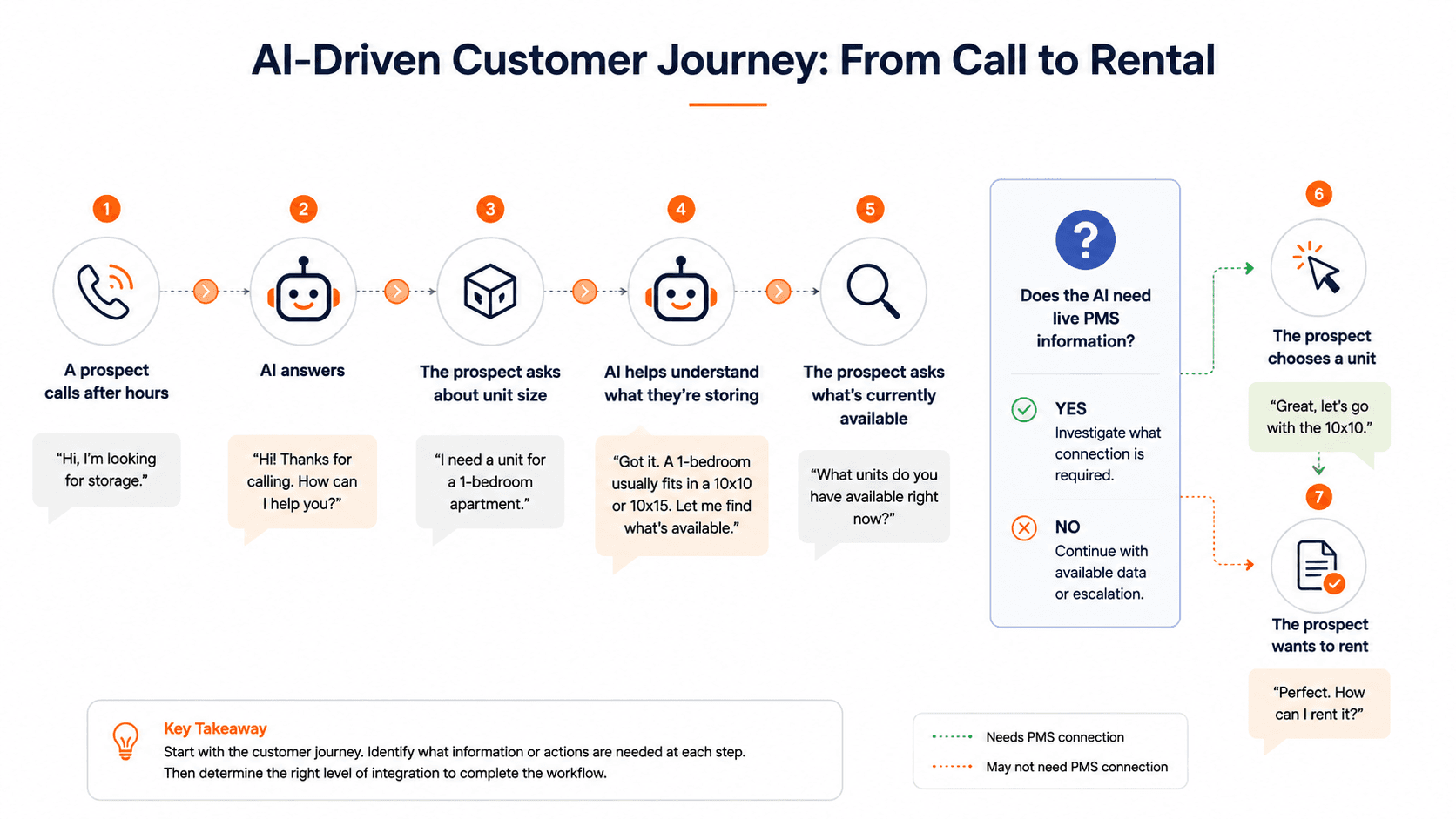
Don’t start with:
“Connect AI to everything.”
Start with one customer journey.
Now ask:
Which system owns the rental process, and what can the integration actually do?
Maybe the AI can continue the workflow.
Maybe the customer needs to move into an existing online rental process.
Maybe an employee needs to take over.
The answer depends on the systems involved.
But now you have an integration roadmap built around an actual customer outcome.
That’s much more useful than connecting systems simply because they can be connected.
What Should AI Connect to in a Self-Storage Operation?
Not every application in your technology stack needs to connect with AI.
Prioritize systems containing information or actions required by the workflows you’re trying to improve.
Depending on your operation, those could include:
Property Management Software
Unit availability, pricing, tenant information, reservations, rentals and other operational records may live here.
Phone Systems
Voice AI requires telephony infrastructure to receive or place calls.
Website and Chat
Customer journeys increasingly begin online, so website interactions may be another important entry point.
Payment Systems
Certain workflows may require payment information or payment actions, subject to appropriate security and system capabilities.
CRM and Lead Management
Prospect information and conversation outcomes may need to flow into existing sales processes.
Messaging Systems
SMS and email can become part of customer follow-up and support workflows.
Access-Control Systems
Some customer-service scenarios involve gates or facility access. Whether those systems can or should connect with another platform depends on the technologies involved and available interfaces.
The objective isn’t:
Connect everything.
It’s:
Connect what the workflow requires.
Common Mistakes With Self-Storage Software Integrations
Mistake 1: Choosing Technology Based on a Logo Wall
A provider displaying twenty integration logos isn’t automatically more useful than one supporting the specific workflow you need.
Integration quantity isn’t the goal.
Operational usefulness is.
Mistake 2: Assuming “Integration” Means Full Access
An integration may legitimately exist while exposing only certain information or actions.
Ask exactly what it supports.
Mistake 3: Integrating Everything at Once
Start with a high-value workflow.
Prove that it works.
Then expand.
Mistake 4: Replacing Software That Already Works
Adding AI shouldn’t automatically trigger a PMS migration.
If your existing platform handles property operations effectively, consider whether AI can extend the customer-facing or automation layer around it.
Mistake 5: Giving AI More Access Than It Needs
If a workflow only needs facility hours, it shouldn’t require access to tenant financial information.
Permissions should match the task.
Mistake 6: Automating Without a Fallback
Every automated workflow needs an answer to:
“What happens when the system can’t complete this?”
Sometimes the correct answer is human escalation.
Adding AI Without Replacing Your Self-Storage Software
For many operators, this is the real opportunity.
Your PMS may already be good at being a PMS.
You don’t need AI to recreate accounting, inventory management, tenant records, leasing infrastructure and everything else your existing software already handles.
Instead, AI can potentially sit closer to the customer.
Think about the technology stack in three layers:
PMS and operational software
The systems of record and operational workflows.
↓
AI layer
Customer conversations, assistance and automation.
↓
Employees
Judgment, exceptions and physical operations.
The exact architecture will vary by business, and some workflows may require connections between those layers.
But adding AI doesn’t inherently mean replacing the software underneath it.
It means deciding where AI can remove friction—and then determining what information and connectivity it needs to do that reliably.
What This Means for Sitelink, Storable Edge, Yardi and Other Platforms
If you use Sitelink, Storable Edge, Yardi Breeze Premier, Yardi Storage Manager, or another self-storage PMS, don’t assume that adding AI requires abandoning it.
At the same time, don’t assume every AI product automatically integrates with your software.
Instead, answer three questions:
1. What do we want AI to accomplish?
2. Which existing system contains the information or action required?
3. What connectivity between those systems is actually available?
If a direct connection is required, ask the PMS provider about existing integrations, third-party interfaces and API access.
If the workflow doesn’t require PMS data, don’t create unnecessary integration complexity.
That’s why the most useful question isn’t:
“Do you integrate with my software?”
It’s:
“Can you support the workflow I want using the systems I already have?”
Frequently Asked Questions About Self-Storage Software Integrations
What is a self-storage software integration?
A self-storage software integration allows different technology systems used by a storage operator to exchange information or coordinate supported actions. Integrations can range from retrieving information to updating records or triggering workflows.
What is a self-storage PMS integration?
A self-storage PMS integration connects another technology with property-management software. What the connection can do depends on the PMS, available API or interface, permissions and specific implementation.
Does Sitelink have an API?
Yes. Sitelink has published API documentation, and Storable provides API-related support for Sitelink integrations. Access and available functionality are subject to Storable/Sitelink requirements and authorization.
Does storEDGE have an API?
Storable’s published documentation states that Sitelink and storEDGE support third-party vendors through APIs and describes processes for requesting API-related access. storEDGE has since been renamed Storable Edge.
What is the difference between Sitelink and Storable Edge?
Both are Storable facility-management platforms. Storable positions Sitelink around greater configurability, advanced reporting and a substantial third-party integration ecosystem, while Storable Edge emphasizes an integrated platform and streamlined daily operations.
Does Yardi integrate with other software?
Yardi operates an interface program supporting connections between Yardi platforms and third-party technologies. Availability and functionality depend on the particular Yardi product and integration, so operators should verify requirements with Yardi.
Can I ask my PMS provider for API access?
Yes—if the provider offers an API or integration program. Availability, approval requirements and permitted functionality depend on the provider. Storable, for example, documents processes involving third-party integrations and internal API access for Sitelink/storEDGE.
What should I ask my PMS provider before adding AI?
Ask whether APIs or supported integrations are available, what information can be read, what can be written or updated, which actions are supported, how authentication works, whether vendor approval is required, whether a testing environment exists, and whether additional fees apply.
Does EasyBee AI integrate with Sitelink, Storable Edge or Yardi?
Integration availability depends on the platform and specific workflow. Operators should confirm current compatibility with EasyBee AI before assuming a particular PMS integration is available.
Does AI need a PMS integration to work in self-storage?
Not always. AI may be able to answer general facility questions, provide approved information, qualify leads and handle certain customer conversations without live PMS access. Workflows requiring current operational, transaction or account-specific information may require an appropriate connection to the system containing that information.
Do I need to replace my PMS to use AI?
No. AI and property management software serve different purposes. Depending on the use case and available connectivity, an AI layer can potentially work alongside existing operational software rather than replacing it.
Add AI to the Operation You Already Have
Adding AI shouldn’t begin with replacing the systems that already run your facilities.
Start with the customer and operational workflows you want to improve. Identify the information and actions those workflows require. Then determine what your existing software can support through available integrations, APIs or other approved connections.
EasyBee AI helps self-storage operators automate customer conversations and repetitive workflows across voice and digital channels.